Use AI on client contracts and case files without sending your clients’ personal data
A contract or a case file holds the personal data of people who trusted you, not a chatbot. This page is for lawyers who want a first read from ChatGPT, Claude or Copilot after the identifying data has been hidden on their own computer.
Who this is for
Solo lawyers and small firms that already use, or want to use, an AI assistant on contracts, policies and case files, and want clients’ and counterparties’ personal data to stay on their own PC. ContextDeck Docs is a Windows app (Windows 10 and 11).
The problem: pasting is sending
A contract pasted into an AI chat takes everything in it: ID numbers, emails, phone numbers, bank accounts in the payment clauses, addresses. Deleting them by hand on every document takes time, and something almost always slips through on page fourteen.
Whether your firm may use an AI tool on client documents at all depends on your professional rules, your engagement terms and your clients’ consent. Hiding the personal data first reduces what is exposed. It does not settle that question.
What ContextDeck Docs does with a contract
Converts on your PC. PDF, Word, Excel and PowerPoint become text any AI understands, tables intact. Nothing is uploaded: the app goes online only to check your license and look for updates, never with a document.
Hides on its own ID numbers from 32 countries (including RUT, DNI, NIE, CURP, RFC, CPF, CUIT and NIT), emails, phone numbers, cards and bank accounts.
Hides what you tell it, once: the names of the parties and companies, and the labels on your own forms, such as “Address” or “Case file”.
Keeps the same marker for the same person. “ID 1” stands for one person in every document of that client, so the AI can follow who is who without knowing who they are.
Leaves a dated record: what was hidden, in which files, when and on which computer. It never stores the original values.
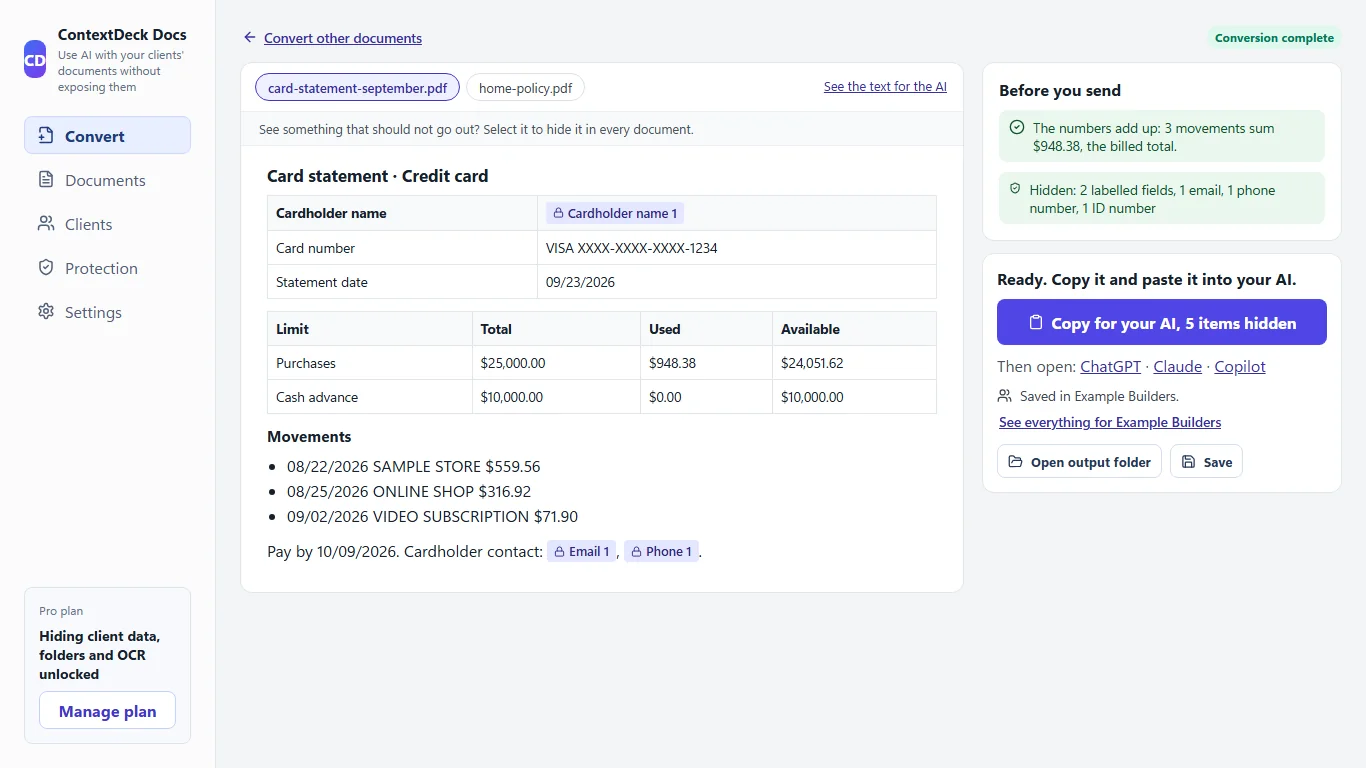
The review screen, with invented data: what was hidden is marked in the document, and a panel lists what the app checked.
Convert. Drop the contract into the app and choose whose it is. With Pro you can also add whole folders, scanned PDFs and photos.
Review. You see what was hidden and what is still visible. If something that looks personal is still showing, the app tells you before you copy and you hide it in one click. If something hidden was not personal, you show it again.
Copy. Copy one document, or all of a client’s, as a single text with your question at the end, and paste it into ChatGPT, Claude or Copilot.
With Pro, if you saved the documents under a client, you can paste the AI’s answer into “Put the names back” and the real names return in place of the markers. It happens on your computer only.
Questions that work well
Detect risks, deadlines and obligations.
Compare the versions and tell me what changed.
Summarize the termination and renewal clauses.
With the personal data hidden, the AI works on the structure and legal content of the document. Check what it tells you against the document itself: it is a first read, not a legal opinion.
What it does not do
ContextDeck reduces the risk of exposing personal data when you use AI and keeps a record of what you did. It is not legal advice, it does not make you compliant with any rule, and it does not control what an AI service does with what you send it.
It does not recognize a name inside a paragraph on its own, and it does not find street addresses by itself. That is why you add the names once, and why the review before you copy matters.
It hides identifiers, not meaning. A sentence that points to one person can still be in the text, and the app cannot know it.
Text read from a scan can contain reading errors, so check it.
The free plan marks personal data but does not hide it. Hiding it before you copy is Pro ($9 per month or $86 per year), with a 14-day trial and no card.
It runs on Windows 10 and 11 only.
Frequently asked questions
Does ContextDeck make my use of AI compliant with professional confidentiality rules?
No. It reduces the risk of exposing personal data and keeps a record of what you did. It is not legal advice, and what your jurisdiction and your clients allow is for you and your own adviser to decide.
Are my clients’ documents uploaded anywhere?
No. They are converted and their data hidden on your computer. The app only goes online to check your license and look for updates, never with a document.
Can the AI still understand the contract with the data hidden?
Yes. Text, dates and amounts stay intact, and each hidden item has a stable marker: “ID 1” is the same person in every document of that client.
What does it not hide automatically?
Names of people and companies inside a paragraph, and street addresses. You add the names once and they are hidden in every document, or you select them during the review.
Does it work with scanned contracts and Word files?
It accepts PDF, Word, Excel and PowerPoint. With Pro it also handles whole folders, scanned PDFs and photos. Text read from a scan can contain reading errors, so check it.
Is it free?
The Free plan marks the personal data it finds but does not hide it. Hiding it before you copy is part of Pro, which you can try for 14 days without a card.
ContextDeck reduces the risk of exposing personal data when you use AI and keeps a record of what you did. It is not legal advice and does not replace the legal review your own jurisdiction requires.
Try it on a sample document
Try Pro free for 14 days, no card. You download the Windows app and nothing is uploaded to the internet.