Use AI on HR documents without sending employees’ personal data
Employment contracts, payroll files and policies hold the personal data of people who never agreed to have it pasted into a chatbot. This page is for HR teams that want help from ChatGPT, Claude or Copilot with the identifying data hidden on their own computer first.
Who this is for
HR and people teams, and small employers, who handle employment contracts, payroll files and similar documents and want to use an AI assistant on them. ContextDeck Docs is a Windows app (Windows 10 and 11).
It was built around the documents of accountants and lawyers. The hiding works the same on any document, HR files included, but it has no HR-specific features: no payroll logic and no HR checks.
The problem: an HR file is all personal data
An employment contract or a payroll file carries the employee’s name, national ID number, email, phone and the bank account where they are paid. Pasted into an AI chat, all of it goes to a third party.
Whether you may send employee documents to an AI tool, even with identifiers hidden, depends on your employer’s policy, your local labor and data protection rules and, where there is one, your data protection officer. Hiding the personal data first reduces what is exposed. It does not decide that.
What ContextDeck Docs does with an HR file
Converts on your PC. PDF, Word, Excel and PowerPoint become text any AI understands, tables intact. Nothing is uploaded: the app goes online only to check your license and look for updates, never with a document.
Hides on its own ID numbers from 32 countries (including RUT, DNI, NIE, CURP, RFC, CPF, CUIT and NIT), emails, phone numbers, cards and bank accounts.
Suggests the labels of your forms. On forms that print “Name”, “Address” or “Date of birth” in front of the value, the app suggests those labels, you accept them in the review, and what follows them is hidden.
Hides the names you add, once. You can also select a name during the review and hide it in every document.
Keeps the same marker for the same person within a client’s documents, so the AI can tell “ID 1” from “ID 2” without knowing who they are.
Leaves a dated record: what was hidden, in which files, when and on which computer. It never stores the original values.
Shares one setup across a team. The Teams plan (from 3 seats) shares one profile of countries, clients and fields to hide, and keeps a record from every computer.
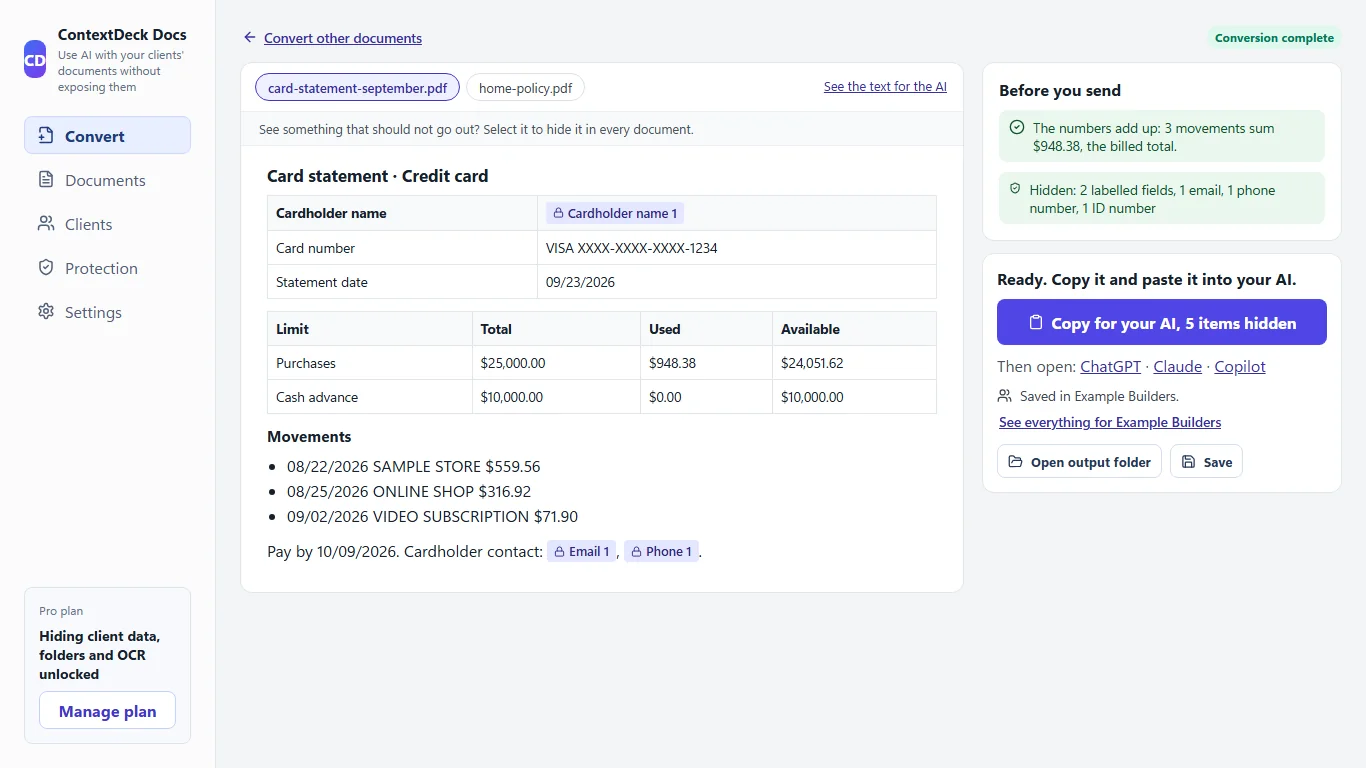
The review screen, with invented data: what was hidden is marked in the document, and a panel lists what the app checked.
Step by step
Convert. Drop the document into the app and choose whose it is. It accepts PDF, Word, Excel and PowerPoint. With Pro you can also add whole folders, scanned PDFs and photos.
Review. You see what was hidden and what is still visible. If something that looks personal is still showing, the app tells you before you copy and you hide it in one click. If something hidden was not personal, you show it again.
Copy. Copy the document as a single text with your question at the end, and paste it into ChatGPT, Claude or Copilot.
Questions that work well
Detect risks, deadlines and obligations.
Compare the versions and tell me what changed.
Summarize the notice period and probation clauses in plain language.
The first two are among the questions the app can suggest when you copy; the third is an example of your own. Check every answer against the document: it is a first read, not an HR or legal opinion.
What it does not do
ContextDeck reduces the risk of exposing personal data when you use AI and keeps a record of what you did. It is not legal advice, it does not make you compliant with any labor or data protection rule, and it does not control what an AI service does with what you send it.
It hides identifiers, not sensitive content. A salary, a performance note or a disciplinary text stays as written, and a text that describes one person’s situation can still point to them.
It does not recognize a name inside a paragraph on its own. On a spreadsheet with a column of employee names, nothing hides them until you add them or check the result, so a long list means a long job. Review what is still visible before you copy.
It does not find street addresses by itself, and text read from a scan can contain reading errors.
The free plan marks personal data but does not hide it. Hiding it before you copy is Pro ($9 per month or $86 per year), with a 14-day trial and no card.
It runs on Windows 10 and 11 only.
Frequently asked questions
Is ContextDeck made for HR?
It was built around the documents of accountants and lawyers. It hides the same kinds of identifiers in any document, HR files included, but it has no HR-specific features such as payroll checks.
Does it hide salaries or performance notes?
No. It hides identifiers such as ID numbers, emails, phones, cards and bank accounts. Amounts, dates and text stay as written, so the content of a file is still visible to the AI.
Can I use it on payroll spreadsheets?
It accepts Excel files and hides ID numbers, emails, phones, cards and bank accounts. It does not find employee names on its own: you add them, or you check the result before you copy.
Are employee documents uploaded anywhere?
No. They are converted and their data hidden on your computer. The app only goes online to check your license and look for updates, never with a document.
Does this make my use of AI compliant with labor or data protection rules?
No. It reduces the risk of exposing personal data and keeps a record of what you did. Whether and how you may use an AI tool on employee data is for your employer, your adviser or your data protection officer to decide.
Can several people in HR share the same settings?
With the Teams plan, from 3 seats: it shares one profile of countries, clients and fields to hide across the team and keeps a record from every computer.
ContextDeck reduces the risk of exposing personal data when you use AI and keeps a record of what you did. It is not legal advice and does not replace the legal review your own jurisdiction requires.
Try it on a sample document
Try Pro free for 14 days, no card. You download the Windows app and nothing is uploaded to the internet.