Use AI on bank statements and invoices without sending your clients’ data
Month-end is when AI helps most, and when a pile of statements and invoices carries the names, ID numbers and account numbers of every client. This page is for accountants who want the analysis without sending that data to an AI service.
Who this is for
Accountants and bookkeepers who prepare statements, invoices and returns for clients, and use or want to use ChatGPT, Claude or Copilot on them. ContextDeck Docs is a Windows app (Windows 10 and 11).
The problem: a statement carries more than the numbers
A bank or card statement pasted into an AI chat carries the holder’s name, ID number, email, phone, and account or card numbers to a third party. Removing them by hand, document by document, does not scale during a close, and something always slips through.
Whether and how you may send client documents to an AI tool depends on your engagement terms, your clients’ consent and the rules where you work. Hiding the personal data first reduces what is exposed. It does not answer that question.
What ContextDeck Docs does with a statement or an invoice
Converts on your PC. PDF, Word, Excel and PowerPoint become text any AI understands, tables intact. Nothing is uploaded: the app goes online only to check your license and look for updates, never with a document.
Hides on its own ID numbers from 32 countries (including RUT, DNI, CPF, CUIT and NIT), emails, phone numbers, cards and bank accounts. Amounts and dates stay, so the AI reads every figure without knowing whose it is.
Keeps each client’s documents together: statements, invoices and returns under their client, ready to copy as a single text with your question.
Protects the client record. A client’s legal name, tax ID and contact are stored encrypted on your computer, and what they hold is hidden in everything you convert for that client.
Keeps the same marker month after month for each person, with Pro, so a client’s documents from different months line up.
Leaves a dated record: what was hidden, in which files, when and on which computer. It never stores the original values.
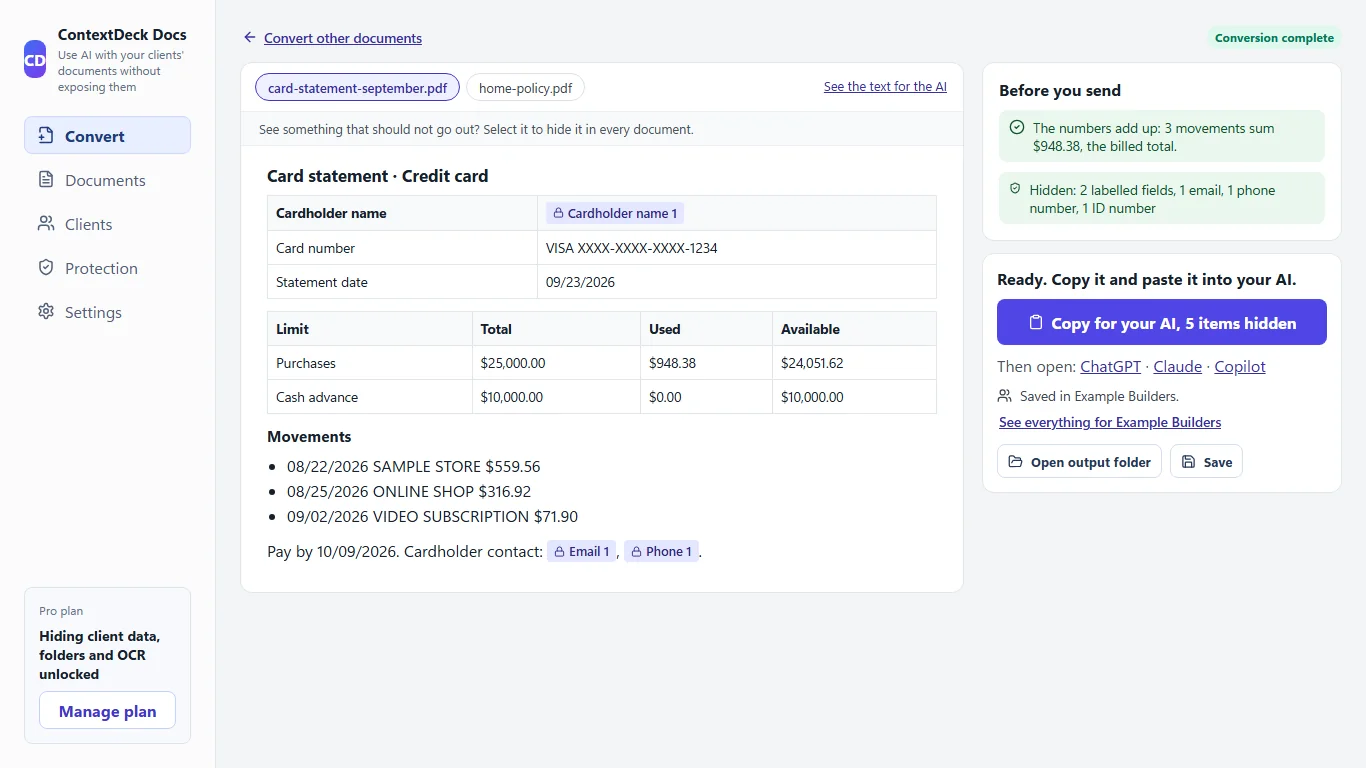
The review screen, with invented data: what was hidden is marked in the document, and a panel lists what the app checked.
The numbers add up, before the AI reads them
On statements, the app checks that the movements add up to the billed total. On invoices, it checks that net plus tax equals the total, and shows you the difference if it does not. It is a pre-check, so you do not ask an AI to analyze a document that already contains an error. It is part of the free plan too.
It only checks when it can read the figures without ambiguity (for a statement, the billed total and at least three movements). On a layout it cannot read, no check appears, so test it on a sample of your clients’ statements before relying on it.
Step by step
Convert. Drop the statements, invoices and returns into the right client. The app converts them to text with the tables intact. With Pro you can also add whole folders, scanned PDFs and photos.
Review. You see what was hidden and what is still visible, and the result of the add-up check. If something that looks personal is still showing, you hide it in one click.
Copy. Copy one document, or everything for a client, as a single text with your question at the end, and paste it into ChatGPT, Claude or Copilot.
Questions that work well
Do the net, the tax and the total agree?
Categorize the expenses of the period.
Add up the invoices: net, tax and total.
The AI’s answer is a draft: check the categories and the sums against the documents before you use them. ContextDeck prepares the document; the accounting stays yours.
What it does not do
ContextDeck reduces the risk of exposing personal data when you use AI and keeps a record of what you did. It is not legal or tax advice, it does not make you compliant with any rule, and it does not control what an AI service does with what you send it.
It does not recognize a name inside a paragraph on its own, and it does not find street addresses by itself. Add the names once, and review what is still visible before you copy.
The add-up check only appears when the figures can be read; its absence is not a confirmation.
Text read from a scan can contain reading errors, so check it.
The free plan marks personal data and checks totals (up to 3 files at a time, 30 a month) but does not hide anything. Hiding it before you copy is Pro ($9 per month or $86 per year), with a 14-day trial and no card.
It runs on Windows 10 and 11 only.
Frequently asked questions
Can the AI still analyze the amounts if the client’s data is hidden?
Yes. Personal data is hidden, not the amounts or dates. The figures and transactions stay visible for the analysis.
Does it also check invoices?
Yes. It checks that net plus tax equals the total and shows you the difference if it does not.
Will it work with every bank’s statement layout?
There is no guarantee. The add-up check needs to read the billed total and at least three movements; on a layout it cannot read, no check appears. Try a few of your clients’ real layouts first, with the 14-day trial.
Are my clients’ documents uploaded anywhere?
No. They are converted and their data hidden on your computer. The app only goes online to check your license and look for updates, never with a document.
Does this make me compliant with data protection law?
Not on its own. It helps you avoid exposing client data when you use AI and keeps a record of what you did. Full compliance with the law where you work is for your adviser to define.
Is it free?
The Free plan marks the personal data it finds and checks whether statements and invoices add up, but does not hide the data. Hiding it before you copy is part of Pro, which you can try for 14 days without a card.
ContextDeck reduces the risk of exposing personal data when you use AI and keeps a record of what you did. It is not legal advice and does not replace the legal review your own jurisdiction requires.
Try it on a sample document
Try Pro free for 14 days, no card. You download the Windows app and nothing is uploaded to the internet.